Software
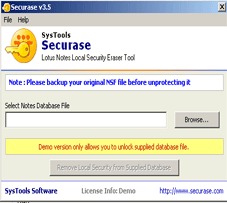
DEMO Version of Securase Software allow users to remove local security settings from provided NSF Database. Securase Software Setup includes one NSF Database having Local security settings. You may open that provided NSF database to check whether it is having local security settings or showing "You are not authorized to access that database." error.
Remove Local Security Settings from Unlimited NSF Database
To remove local security settings from unlimited NSF Database order the award-winning software online. Activation Details and Full version software will be emailed INSTANTLY after product purchase.
Download now Securase and remove security settings from local NSF Database !
Click the Start Download Now button to begin the download.
If possible, save then install the Securase installation program.
Run Securaser Software, browse Local NSF database having security settings, remove local security settings and evaluate the software.


We're Here to Help You
Securase Software
Awards